Computer Skills to Put on Resume: 50+ Skills for 2026
What computer skills to put on a resume in 2026? Learn 50+ top computer skills employers want, how to list them, and examples for different roles.
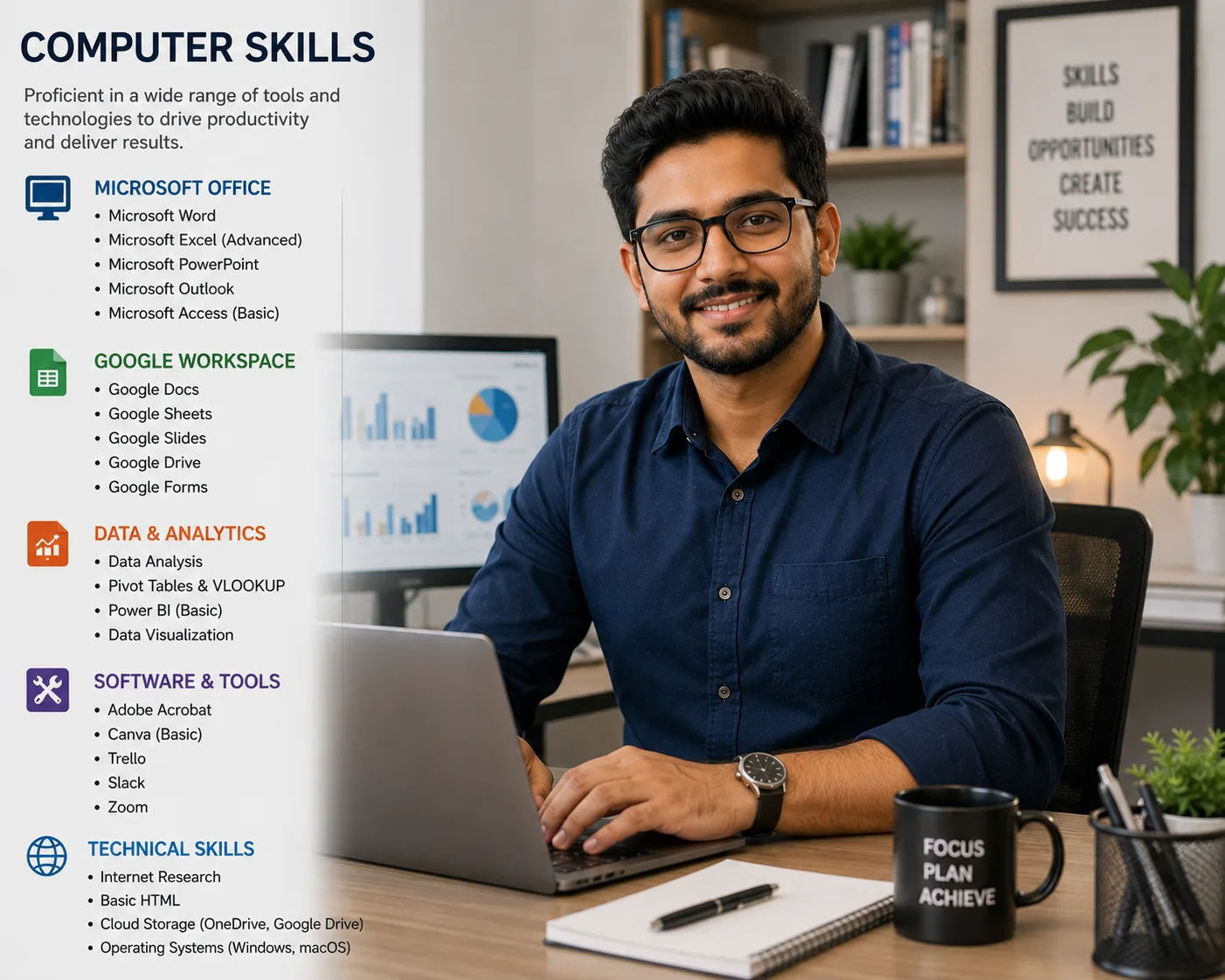
Introduction: Why Computer Skills Matter on Your Resume
According to NACE Job Outlook 2026, 50% of employers seek computer skills on resumes. According to UseSprout (via Forbes, 2026), 76% of companies use ATS to filter resumes by skills before a human ever sees them.
As Abu Talha Zobair, a career expert, explains:
> "Skills like Pivot Tables, Power Query, Dashboards, and Lookup functions will be essential. Across Banking, FMCG, Supply Chain, HR, and Finance, Excel remains a core skill."
According to ResuFit, a resume optimization platform:
> "Listing the obvious 'Microsoft Word', 'email', 'internet browsing' — every professional in 2026 can do these. Listing them wastes space and signals that you don't have more substantive skills to mention."
This guide covers 50+ computer skills to put on your resume, organized by category and proficiency level, with expert tips on how to list them effectively.
“Computer Skills — Key Takeaways
50% of employers seek computer skills (NACE 2026)
76% of companies use ATS to filter resumes by skills
Excel remains a core skill across Banking, FMCG, Supply Chain, HR, and Finance
List basic, intermediate, and advanced computer skills
Avoid generic 'Microsoft Word' and 'email' — they waste space
Include specific software names and proficiency levels
Prove computer skills with quantifiable achievements”
What You'll Learn in This Guide
- The most in-demand computer skills for 2026
- 50+ computer skills organized by category
- Basic vs. intermediate vs. advanced computer skills
- How to list computer skills on your resume
- How to prove computer skills with achievements
- Common mistakes to avoid
The Most In-Demand Computer Skills for 2026
According to industry data and expert analysis, here are the most in-demand computer skills for 2026:
| Level | Skills | Best For |
|---|---|---|
| Basic | Microsoft Office (Word, Excel, PowerPoint, Outlook), Google Workspace (Docs, Sheets, Slides, Drive), Email Management, Web Browsing, File Management, Video Conferencing (Zoom, Teams, Google Meet) | Most roles require these baseline skills |
| Intermediate | Excel (Pivot Tables, VLOOKUP, Power Query, Dashboards), CRM (Salesforce, HubSpot), Project Management (Jira, Trello, Asana), Design (Canva, Adobe Creative Suite), Data Visualization (Tableau, Power BI) | Many professional roles require intermediate proficiency |
| Advanced | Programming (Python, Java, SQL, C++), Cloud Computing (AWS, Azure, GCP), Cybersecurity, AI Tools (ChatGPT, Copilot, Claude), DevOps (Docker, Kubernetes, CI/CD), Machine Learning, Big Data (Hadoop, Spark) | Technology and data-driven roles require advanced skills |
50+ Computer Skills to Put on Your Resume
Productivity and Office Skills
- Microsoft Word (Document creation, formatting, editing, templates)
- Microsoft Excel (Pivot Tables, VLOOKUP, Power Query, VBA, Macros)
- Microsoft PowerPoint (Presentations, slide design, animations)
- Microsoft Outlook (Email management, calendar, contacts, rules)
- Google Docs (Document creation, collaboration, commenting)
- Google Sheets (Spreadsheets, formulas, data analysis)
- Google Slides (Presentations, collaboration)
- Google Drive (File storage, sharing, organization)
- Gmail (Email management, filters, labels, inbox organization)
- File Management (Organizing, compressing, sharing files)
- Web Browsing (Google Chrome, Firefox, Safari)
- Online Research (Effective searching, evaluating sources)
- Typing (40+ WPM)
Collaboration and Communication Skills
- Slack (Team communication, channels, integrations)
- Microsoft Teams (Meetings, file sharing, collaboration)
- Zoom (Video conferencing, breakout rooms, webinar hosting)
- Google Meet (Video conferencing)
- Trello (Project management, boards, cards)
- Asana (Task management, project tracking)
- Jira (Project management, agile workflows)
- SharePoint (Document management, collaboration)
- Dropbox (File sharing, cloud storage)
- OneDrive (Cloud storage, file synchronization)
Design and Creative Skills
- Canva (Design, graphics, templates)
- Adobe Photoshop (Image editing, design)
- Adobe Illustrator (Vector graphics, design)
- Adobe InDesign (Layout design, publications)
- Figma (UI/UX design, prototyping)
- Adobe Premiere Pro (Video editing)
- Adobe Acrobat (PDF creation, editing, signing)
- Sketch (UI/UX design)
- Blender (3D modeling, animation)
Data and Analytics Skills
- SQL (Database querying, data extraction)
- Python (Programming, automation, data analysis)
- Tableau (Data visualization, dashboards)
- Power BI (Business intelligence, analytics)
- Google Analytics (Website traffic, user behavior)
- Excel Advanced (Pivot Tables, Power Query, VBA)
- R (Statistical analysis, data visualization)
- Data Entry (Accuracy, speed, attention to detail)
- Data Analysis (Data cleaning, analysis, interpretation)
- Data Visualization (Graphs, charts, dashboards)
Marketing and Social Media Skills
- SEO (Search Engine Optimization)
- SEM (Search Engine Marketing)
- Google Ads (PPC advertising)
- Social Media Management (LinkedIn, Twitter, Instagram, TikTok)
- Content Management Systems (WordPress, Shopify, HubSpot)
- Email Marketing (Mailchimp, Constant Contact)
- CRM Software (Salesforce, HubSpot)
- Google Analytics (Website traffic, user behavior)
Advanced Technical Skills
- Programming (Python, Java, JavaScript, C++, SQL, R)
- Cloud Computing (AWS, Azure, GCP)
- Cybersecurity (Network security, data protection, threat analysis)
- AI Tools (ChatGPT, Copilot, Claude, Gemini)
- Prompt Engineering (AI prompt design, optimization)
- DevOps (Docker, Kubernetes, CI/CD, Terraform)
- Front-End Development (HTML, CSS, JavaScript, React)
- Back-End Development (Node.js, Django, Ruby on Rails)
- Machine Learning (Algorithm development, predictive modeling)
- NLP (Natural Language Processing)
How to List Computer Skills on Your Resume
According to Sho Dewan, Forbes career expert:
> "Place this skills section near the top of your resume so ATS and recruiters see it quickly. Use the same words you see in job descriptions so your resume is more likely to be picked up by keyword filters."
Option 1: Dedicated Skills Section
List computer skills in a clean, scannable format. Organize by category or proficiency level.
Example:
- Microsoft Office Suite (Word, Excel, PowerPoint, Outlook)
- Google Workspace (Docs, Sheets, Slides, Drive)
- Excel: Pivot Tables, Power Query, VLOOKUP
- Salesforce CRM
- Jira and Trello
- Canva and Adobe Photoshop
- Python and SQL
- AWS (EC2, S3, Lambda)
Option 2: Professional Summary
Weave in 3-5 of the most important computer skills.
Option 3: Work Experience Bullet Points
Prove computer skills with quantifiable achievements.
How Many Computer Skills Should You List?
According to Sho Dewan, Forbes career expert:
> "Start by listing 6 to 8 core skills that match the job you want."
The Sweet Spot: 8-12 computer skills total, organized by category or proficiency level.
According to ResuFit:
> "Listing the obvious 'Microsoft Word', 'email', 'internet browsing' — every professional in 2026 can do these. Listing them wastes space and signals that you don't have more substantive skills to mention."
Focus on skills that differentiate you. Include specific software names and proficiency levels.
Before vs After: Computer Skills Section
| Before (Weak) | After (Strong) | The Fix (Why It Works) |
|---|---|---|
| "Microsoft Office" | "Microsoft Office Suite: Advanced Excel (Pivot Tables, VBA, Power Query), PowerPoint (Executive Presentations), Outlook (Email Management)" | Generic replaced with specific, verifiable proficiencies |
| "Computer skills" | "Python (Data Analysis), SQL (Database Queries), Tableau (Data Visualization)" | Vague category replaced with specific tools and purposes |
| "CRM" | "Salesforce (CRM), HubSpot (Marketing Automation)" | Generic replaced with specific software names |
| "Project management tools" | "Jira, Trello, Asana (Project Management Tools)" | Specific tools listed instead of generic category |
The AI Skills Surge: What You Need to Know
According to Catherine Fisher, LinkedIn Career Expert:
> "Candidates who demonstrate their fluency in artificial intelligence are much more likely to pique hiring managers' interest. Highlight how you've used AI to generate business gains."
According to EdWeek Research Center, 61% of teachers are using AI-driven tools in classrooms, demonstrating the widespread adoption of AI across industries.
AI Skills to Consider Adding:
- Prompt Engineering
- AI Implementation
- AI Workflow Automation
- Generative AI (ChatGPT, Copilot, Claude, Gemini)
- AI Strategy and Governance
- Machine Learning (ML) Basics
- Natural Language Processing (NLP)
- AI-Powered Data Analysis
Common Mistakes to Avoid
- Listing obvious skills like 'email' or 'internet browsing': According to ResuFit, these waste space and signal you don't have more substantive skills.
- Using generic terms instead of specific software names: 'CRM' is vague; 'Salesforce' is specific.
- Not including proficiency levels: 'Basic Excel' vs. 'Advanced Excel (Pivot Tables, VBA, Power Query)'.
- Listing outdated software: If you are applying for a modern role, don't focus on outdated technologies.
- Not customizing for each job: Different roles require different computer skills.
- Hiding skills in text: Use a dedicated skills section for scannability.
Expert Quotes to Remember
“"Skills like Pivot Tables, Power Query, Dashboards, and Lookup functions will be essential. Across Banking, FMCG, Supply Chain, HR, and Finance, Excel remains a core skill."”
“"Listing the obvious 'Microsoft Word', 'email', 'internet browsing' — every professional in 2026 can do these. Listing them wastes space and signals that you don't have more substantive skills to mention."”
“"Candidates who demonstrate their fluency in artificial intelligence are much more likely to pique hiring managers' interest."”
“"Place this skills section near the top of your resume so ATS and recruiters see it quickly."”
Sources & References
- NACE Job Outlook 2026 – 50% of employers seek computer skills
- Forbes / Sho Dewan – Skills section strategy
- ResuFit – Computer skills optimization
- EdWeek Research Center – 61% of teachers using AI tools
- LinkedIn / Catherine Fisher – AI skills and hiring
- Abu Talha Zobair – Excel and computer skills expert
Conclusion: Build Your Computer Skills Resume Today
Your computer skills are essential in 2026. According to NACE 2026, 50% of employers seek computer skills on resumes.
Key Takeaways:
- Include 8-12 computer skills on your resume
- Use specific software names, not generic categories
- Include proficiency levels (Basic, Intermediate, Advanced)
- Prove skills with quantifiable achievements
- Add AI and digital literacy skills
- Tailor your skills to each specific role
Action Steps for Today:
1. Review the job descriptions you are targeting
2. Identify the top 8-12 computer skills they mention
3. Create a dedicated skills section near the top of your resume
4. Add specific software names and proficiency levels
5. Prove each skill with a quantifiable achievement in your experience section
6. Build your skills-first resume with our ATS CV Maker
What computer skills should I put on my resume?
The best computer skills to put on your resume depend on your role. Basic skills include Microsoft Office (Word, Excel, PowerPoint) and Google Workspace. Intermediate skills include Excel (Pivot Tables, VLOOKUP), CRM (Salesforce, HubSpot), and project management tools (Jira, Trello). Advanced skills include programming languages (Python, Java, SQL), cloud computing (AWS, Azure, GCP), and AI tools (ChatGPT, Copilot).
How do I list computer skills on a resume?
List computer skills in a dedicated skills section near the top of your resume. Organize them by proficiency level (Basic, Intermediate, Advanced) or by category (Productivity, Design, Development). According to Forbes career expert Sho Dewan, place this section near the top so ATS and recruiters see it quickly. Include both acronyms and full forms (e.g., 'CRM (Customer Relationship Management)').
What are basic computer skills for a resume?
Basic computer skills include Microsoft Office Suite (Word, Excel, PowerPoint, Outlook), Google Workspace (Docs, Sheets, Slides, Drive), email management, web browsing, file management, and video conferencing (Zoom, Teams, Google Meet). According to NACE 2026, 50% of employers seek computer skills on resumes.
What are advanced computer skills for a resume?
Advanced computer skills include programming languages (Python, Java, SQL, C++), cloud computing (AWS, Azure, GCP), cybersecurity, data analysis (Tableau, Power BI), AI and machine learning (Prompt Engineering, AI Implementation), DevOps (Docker, Kubernetes, CI/CD), and software development frameworks.
Should I include Microsoft Office on my resume?
Yes, but be specific. Instead of just listing 'Microsoft Office,' specify your proficiency with Excel (Pivot Tables, VBA, Power Query), PowerPoint (Advanced animations, templates), or Outlook (Advanced email management, rules). According to industry data, Excel remains a core skill across Banking, FMCG, Supply Chain, HR, and Finance.
About the Author
Ash is a resume expert and career strategist who helps job seekers land their dream roles. With years of experience in resume writing and ATS optimization, Ash has helped thousands of candidates create resumes that get noticed. Ash's work has been featured in leading career publications and is trusted by job seekers worldwide.
Comments
Loading comments…