How to Build an ATS-Compliant Resume in 2026
Learn how to build an ATS-compliant resume in 2026. Complete guide with formatting rules, keyword strategies, and a free ATS-friendly resume template.

Introduction: What is an ATS-Compliant Resume?
When submitting job applications online, your resume will almost certainly pass through an Applicant Tracking System (ATS) before it ever catches the eye of a human recruiter. These software parsing suites scan files to group and sort structured professional parameters based on criteria set by talent acquisition teams.
An ATS-compliant resume is a document formatted specifically to pass this automated screening. It uses standard section headers, avoids complex formatting like tables and columns, includes relevant keywords from the job description, and is saved in a machine-readable format.
In 2026, ATS compliance is no longer optional. According to a study by Jobscan, 98% of Fortune 500 companies use an ATS, and 75% of all resumes are rejected before reaching a human recruiter—often due to formatting or keyword issues. This guide will teach you exactly how to build an ATS-compliant resume that passes automated screening and lands in the hands of hiring managers.
Key Takeaways
“Use Standard Section Headers: 'Experience,' 'Education,' 'Skills'
Avoid Tables and Columns: They confuse ATS parsers
Use Bullet Points: Clean, scannable lists are best
Include Keywords: Mirror the job description language
Save as PDF: Preserves formatting on all devices
Use Professional Fonts: Arial, Calibri, Times New Roman
Quantify Achievements: Numbers and metrics are heavily weighted
Keep It Simple: No graphics, images, or complex designs
Proofread: Errors hurt your ATS score
Use Acronyms and Full Forms: 'CRM (Customer Relationship Management)'”
What is an ATS? (And Why It Matters for Your Resume)
An Applicant Tracking System (ATS) is a software application used by employers to manage the recruitment process. ATS systems scan, filter, and rank resumes based on specific criteria set by the employer. This includes checking for keywords, experience levels, education, certifications, and formatting.
The primary purpose of an ATS is to reduce the volume of resumes that human recruiters must review manually. Instead of reading thousands of applications, recruiters can focus on the top-ranked candidates that the ATS has identified.
Key ATS Statistics for 2026:
- 98% of Fortune 500 companies use an ATS
- 75% of resumes are rejected before reaching a human reviewer
- 35% of resumes are rejected due to formatting issues
- Resumes with relevant keywords are 40% more likely to pass ATS screening
- The average recruiter spends only 7.4 seconds reviewing a resume
Understanding how ATS works is the first step toward creating a resume that passes screening and lands in front of hiring managers.
How ATS Systems Scan Resumes
- Parsing: The ATS extracts text from your resume and organizes it into categories (contact info, work history, education, skills).
- Keyword Matching: The ATS compares the extracted information against keywords and phrases from the job description.
- Ranking: The ATS assigns a score to your resume based on keyword matches, experience, and other criteria. Resumes with higher scores are ranked higher.
- Filtering: The ATS filters out resumes that don't meet minimum criteria (e.g., missing required keywords, lacking required experience).
- Review: The top-ranked resumes are passed to human recruiters for further review.
To pass this process, your resume must be both machine-readable and keyword-optimized. This is why ATS compliance is so important.
The 10 Golden Rules of ATS-Compliant Resume Formatting
Rule 1: Use Standard Section Headers
ATS systems look for standard section headers to organize your information. Use headers like:
Professional Experience / Work History / Employment History
Education
Skills / Core Competencies
Certifications / Licenses
Summary / Professional Summary
Volunteer Experience (if relevant)
Why It Matters: ATS systems are programmed to recognize these standard headers. Creative headers like 'My Journey' or 'Career Highlights' may not be recognized by the ATS, causing your information to be mis-categorized or lost.
Rule 2: Avoid Tables, Columns, and Complex Formatting
Tables and columns confuse ATS parsers. When an ATS scans a table, it may read the information out of order or miss it entirely. Similarly, columns can cause the ATS to mix up information from different sections.
What to Avoid:
- Tables of any kind
- Columns (2-column or 3-column layouts)
- Text boxes
- Sidebars with skills or contact information
- Complex headers or footers
What to Use Instead:
- Simple, single-column layouts
- Bullet points for lists
- Standard indentation
- Horizontal lines for section separation
Rule 3: Use Bullet Points for Experience
Bullet points make your resume easier for both ATS systems and human recruiters to scan. They help organize information into digestible chunks and highlight key achievements.
Best Practices:
- Start each bullet with a strong action verb
- Keep bullets to 1-2 lines
- Include metrics and numbers where possible
- Use consistent punctuation
Example:
Before: 'Managed a team of sales professionals.'
After: 'Led a team of 12 sales professionals, achieving 35% revenue growth and exceeding quarterly targets for 6 consecutive quarters.'
Rule 4: Include Keywords from the Job Description
Keywords are the most important factor in ATS screening. The more keywords from the job description you include in your resume, the higher your ATS score will be.
How to Find Keywords:
- Read the job description carefully
- Identify repeated terms and phrases
- Look for specific skills, tools, and qualifications
- Include both hard skills and soft skills
- Include acronyms and full forms
Example: If the job description mentions 'project management,' 'Agile,' and 'stakeholder communication,' include these terms naturally in your resume.
Rule 5: Save as PDF (Unless Specified)
PDF is the best file format for ATS-compliant resumes because it preserves formatting across all devices. However, some ATS systems may have difficulty parsing certain PDF types. To be safe:
- Save as a simple PDF (no embedded images, fonts, or complex graphics)
- Avoid using PDFs created from Canva or design tools that embed images as text
- If the job posting specifies Word (.docx), use that format instead
- Always check the job posting for specific file format instructions
Rule 6: Use Professional Fonts
ATS systems prefer standard, readable fonts. Avoid fancy or decorative fonts that may not be recognized by the system.
Recommended Fonts:
- Arial
- Calibri
- Times New Roman
- Helvetica
- Verdana
Font Size:
- 10-12pt for body text
- 14-16pt for headings
- 18-22pt for your name
What to Avoid:
- Script fonts
- Decorative fonts
- Comic Sans
- Fonts with special characters
Rule 7: Don't Include Graphics or Images
ATS systems cannot read graphics, images, or photos. Including these elements on your resume can cause parsing errors and reduce your ATS score.
What to Avoid:
- Photos or headshots
- Logos
- Charts and graphs
- Icons
- Decorative borders
- Background images
Rule 8: Quantify Your Achievements
ATS systems and human recruiters both value quantifiable achievements. Numbers, percentages, and metrics demonstrate impact and are heavily weighted in ATS scoring.
Examples:
- 'Increased sales by 35% in 12 months'
- 'Managed a team of 15 professionals'
- 'Reduced costs by $2M annually'
- 'Improved customer satisfaction from 75% to 92%'
- 'Generated 200+ leads per month through targeted campaigns'
Rule 9: Include Acronyms and Full Forms
ATS systems may search for either the acronym or the full form. Including both increases your chances of matching the keywords.
Example:
- 'CRM (Customer Relationship Management)'
- 'SEO (Search Engine Optimization)'
- 'IEP (Individualized Education Plan)'
- 'P&L (Profit and Loss)'
Rule 10: Proofread Carefully
Spelling and grammatical errors can significantly reduce your ATS score. Some ATS systems may even reject resumes with too many errors.
Tips for Proofreading:
- Read your resume out loud
- Use spell-check tools
- Ask someone else to review it
- Check for consistency in formatting
- Verify all dates and contact information
ATS-Compliant Resume Example
“SARAH JOHNSON
Marketing Director
Los Angeles, CA 90001 | (555) 123-4567 | sarah.johnson@email.com | linkedin.com/in/sarahjohnson
Professional Summary
Results-driven Marketing Director with 10+ years of experience developing and executing strategic marketing campaigns for global brands. Proven track record of increasing revenue by 35%, managing budgets of $15M+, and leading cross-functional teams of 20+ professionals. Expert in digital marketing, brand strategy, and market analysis.
Core Competencies
- Digital Marketing and SEO
- Brand Strategy and Development
- Market Research and Analysis
- Budget Management ($15M+)
- Team Leadership and Development
- CRM (Customer Relationship Management)
- Data Analytics and Reporting
- Campaign Optimization
Professional Experience
Marketing Director | GlobalTech Solutions | 2020-Present
- Led marketing strategy for a $500M technology company, increasing revenue by 35% over 3 years.
- Managed a $15M annual marketing budget, optimizing spend and achieving 25% ROI improvement.
- Developed and implemented SEO strategies that increased organic traffic by 200% in 18 months.
- Led a team of 25 marketing professionals across digital, content, and creative functions.
- Implemented CRM and lead generation campaigns that generated 500+ qualified leads monthly.
- Collaborated with product and sales teams to develop go-to-market strategies for 5 new products.
Senior Marketing Manager | BrandFirst Agency | 2016-2020
- Directed marketing campaigns for 15+ clients across technology, healthcare, and retail sectors.
- Grew client accounts by 40% through successful campaign execution and relationship management.
- Managed a team of 12 marketing specialists, providing mentorship and professional development.
- Presented quarterly performance reports to C-suite executives and client stakeholders.
- Developed market research frameworks that identified $5M in new revenue opportunities.
Marketing Manager | GrowthMark Inc. | 2013-2016
- Planned and executed marketing campaigns for a mid-market technology company.
- Increased brand awareness by 60% through targeted social media and content marketing.
- Reduced cost-per-lead by 30% through campaign optimization and A/B testing.
Education
MBA, University of Southern California (2013)
BS in Marketing, UCLA (2010)
Certifications
- Google Analytics Certified
- HubSpot Inbound Marketing Certified
- Project Management Professional (PMP)
Technical Skills
- Google Analytics
- HubSpot CRM
- Salesforce
- SEO and SEM
- Tableau and Data Visualization
- Microsoft Excel and PowerPoint
Professional Memberships
- American Marketing Association (AMA)
- Digital Marketing Association (DMA)”
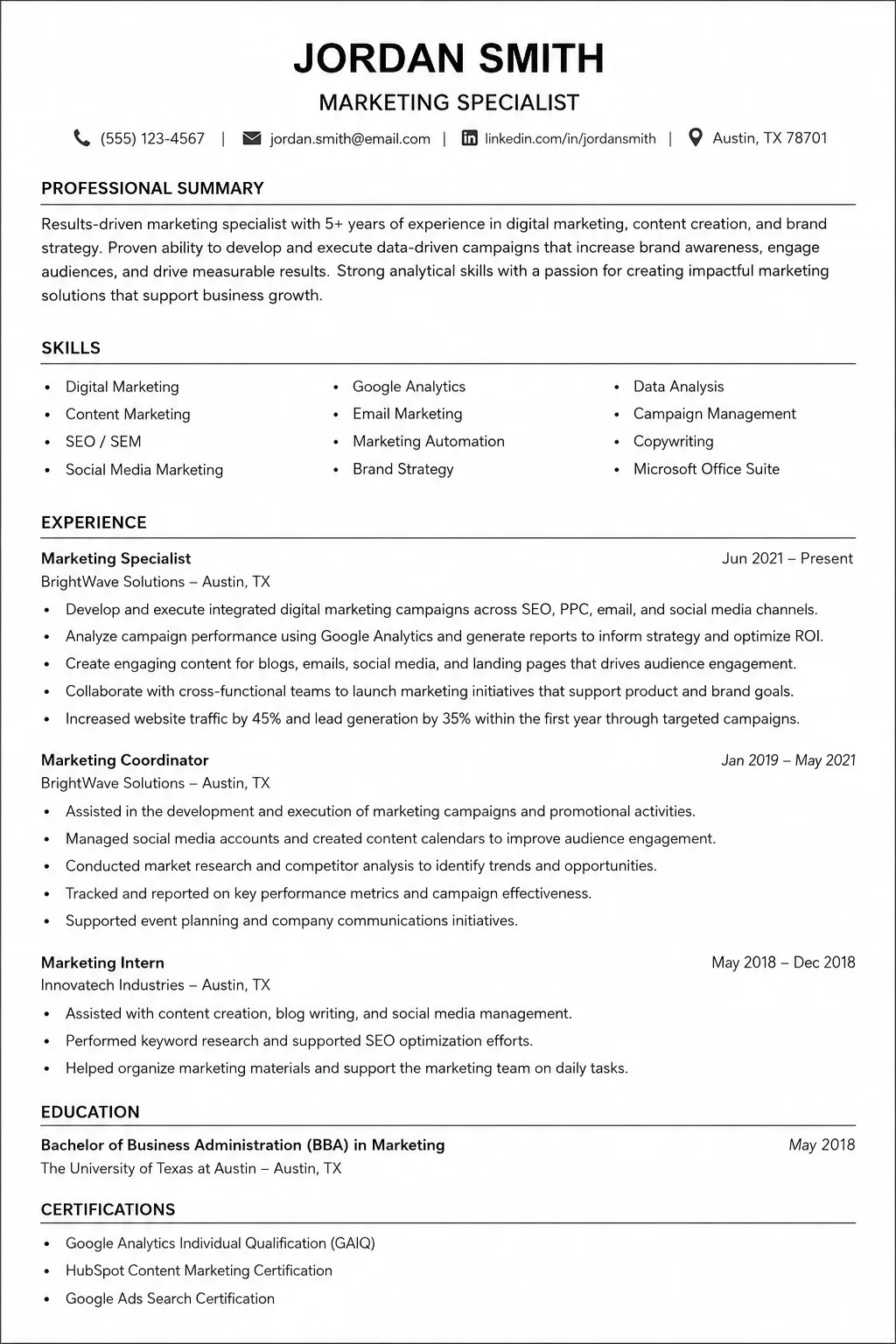
ATS-Compliant Resume Example
Complete ATS-compliant resume example with standard headers, bullet points, and clean formatting.
How to Test Your Resume for ATS Compliance
Before submitting your resume, you should test it for ATS compliance. Here are the most effective ways to do this:
1. Use Free ATS Scanner Tools
There are several free tools that analyze your resume against a job description and provide a match score. Popular tools include Jobscan, ResumeWorded, SkillSyncer, and Rezi. These tools typically provide a match score (0-100%) and highlight areas for improvement, including missing keywords, formatting issues, and content gaps.
2. Test the PDF Parse
Upload your resume to a free ATS parser to see how the system reads it. This will reveal whether the ATS can correctly extract your information. Copy your resume text into a plain text editor (like Notepad) and check that the information appears in the correct order, that no information is missing or garbled, and that section headers are clearly visible.
3. Conduct a Manual Keyword Audit
Compare your resume to the job description and count keyword matches. If you are missing key terms, add them naturally to your resume.
Common ATS Resume Mistakes to Avoid
- Using Tables or Columns: Confuses ATS parsers and can cause information to be misread.
- Including Graphics or Images: ATS cannot read images, photos, or graphics.
- Using Non-Standard Headers: Creative headers may not be recognized by ATS.
- Keyword Stuffing: Overusing keywords makes your resume sound unnatural and can be flagged.
- Saving in the Wrong Format: Some ATS systems struggle with certain file types.
- Using Fancy Fonts: Special characters and unique fonts may not be recognized.
- Missing Contact Information: ATS must be able to extract your phone and email.
- Spelling and Grammar Errors: Errors can reduce your ATS score.
- Overly Long Resumes: Keep it to 1-2 pages for best results.
- Generic Language: 'Hard worker' and 'team player' are not recognized by ATS.
The Truth About ATS and File Formats
There is a common misconception that ATS systems cannot read PDF files. This is not true. Most modern ATS systems can read PDFs effectively. However, there are some important considerations: PDF preserves formatting across all devices and is recommended for most submissions. Word (.docx) is preferred by some older ATS systems. Always check the job posting for specific instructions. Avoid TXT, RTF, Pages, or Google Docs files. Use a professional file name like 'YourName_Resume.pdf'.
How to Create an ATS-Compliant Resume (Step-by-Step)
- Step 1: Choose the Right Template – Start with a clean, single-column template that uses standard section headers.
- Step 2: Write a Professional Summary – Include 2-4 sentences highlighting your experience, key skills, and value proposition.
- Step 3: Add Core Competencies – List 8-12 relevant skills as bullet points.
- Step 4: Detail Your Professional Experience – List your experience in reverse chronological order with quantified achievements.
- Step 5: Include Education and Certifications – List your degrees and relevant certifications.
- Step 6: Add Technical Skills – Include specific tools, software, and platforms you are proficient in.
- Step 7: Save as PDF – Save your resume as a PDF with a professional filename and test with an ATS scanner.
ATS Compliance Checklist
- Standard section headers (Professional Experience, Education, Skills)
- Single-column layout (no tables or columns)
- Bullet points for experience
- Keywords from the job description included naturally
- Quantified achievements with metrics
- Professional fonts (Arial, Calibri, Times New Roman)
- No graphics, images, or photos
- Acronyms and full forms included
- Spell-checked and proofread
- Saved as PDF (unless specified otherwise)
- Professional file name (YourName_Resume.pdf)
- Contact information clearly visible
- One page (or two for experienced professionals)
- Tested with an ATS scanner tool
Conclusion: Build Your ATS-Compliant Resume Today
Building an ATS-compliant resume is essential for getting your application past automated screening and into the hands of human recruiters. By following the rules outlined in this guide—using standard section headers, avoiding tables and columns, including relevant keywords, and saving as PDF—you can significantly increase your chances of landing interviews.
Next Steps: Start building your ATS-compliant resume with our ATS CV Maker. Review the Resume Foundations Guide for broader context. Check the ATS Keywords Checklist for keyword optimization. Read the Resume Format Rules for formatting details.
Comments
Loading comments…