Certifications on Resume: How to List Them with Examples
Learn how to list certifications on your resume with examples, formatting tips, and expert advice. Where to put certifications and which ones to include.
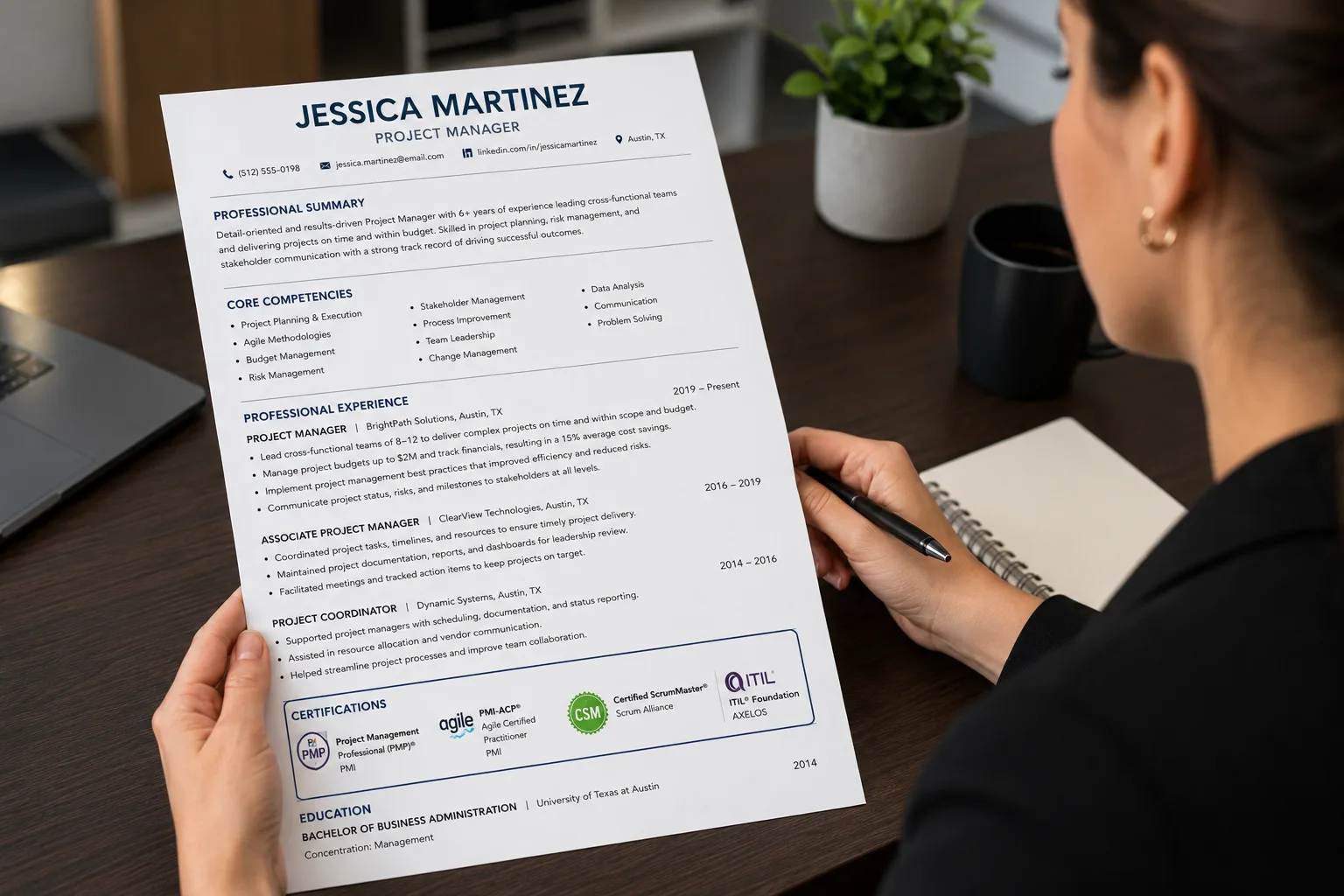
Introduction: The Certification Advantage
Your resume has one job: to convince a hiring manager you are the right person for the role. Certifications can be some of the most powerful evidence you can offer. According to the Bureau of Labor Statistics (BLS), workers with a currently active certification or license participated in the labor force at a higher rate and had a lower unemployment rate than people without one. Median earnings for workers with a required certification or license were $1,224 in 2018, compared to $929 for those without.
Certifications are objective, verifiable proof of a skill. Recruiters and applicant tracking systems (ATS) actively search for them by name. A single line like "PMP" or "RN" or "AWS Certified" can be the difference between landing in the interview pile and the reject pile.
This guide covers everything you need to know about listing certifications on your resume — where to put them, how to format them, which ones to include, and common mistakes to avoid.
“Certifications on Resume — Key Takeaways
Certified workers earn $1,224 vs $929 median weekly
Higher labor force participation for certified workers
Lower unemployment for certified workers
Place required certifications in your header
Create a dedicated Certifications section for most roles
Format consistently: Name (Acronym) — Issuer, Date
Include expiration dates where applicable
List in-progress certifications with expected dates”
What You'll Learn in This Guide
- Why certifications matter on your resume
- Where to put certifications (4 placement options)
- How to format certification entries correctly
- Which certifications to include (and which to skip)
- How to list in-progress certifications
- The difference between licenses and certifications
- Common mistakes to avoid
- A complete resume example
Why Certifications Matter on a Resume
Certifications strengthen your resume and show employers you are invested in your professional development. Here are the top reasons to include certifications on your resume:
1. Meet Role or Industry Requirements
Some professions legally require specific certifications or licenses to obtain work. These credentials must be clearly listed on your resume. If your certification is required by law or industry regulation, make sure it is easy to find, ideally near your name or in a dedicated section.
Examples include nursing licenses (RN, LPN), state-specific teaching credentials, commercial driver's licenses (CDL), and certifications like CompTIA Security+ for cybersecurity roles.
2. Strengthen a Resume with Limited Experience or No Degree
Certifications demonstrate verified, job-ready skills, which can help balance limited education or professional experience. For early-career professionals, a relevant certification can be stronger than a thin work history.
3. Validate Your Skills and Stand Out to Employers
Certifications provide measurable proof of your expertise and credibility, helping you stand out in a competitive job market. According to SHRM, for professions like HR, well-recognized professional credentials like SHRM-CP and SHRM-SCP "instantly add credibility to your resume."
4. Support a Career Change or New Direction
Certifications can help bridge skill gaps and align your experience with the expectations of a new industry or role.
5. Add Real Value to Your Application
Certifications show commitment to continuous learning and enhance your qualifications, employment opportunities, and long-term career growth.
Where to Put Certifications on a Resume
The placement of your certifications depends on the role you are applying for and the nature of the credential. According to Resumly, for most jobs, certifications belong in their own clearly labeled "Certifications" or "Licenses & Certifications" section placed below your work experience and education. This keeps the resume scannable: experience earns the interview, and the certifications section backs it up with credentials a recruiter can verify.
However, there is one important exception.
Option 1: In the Header (After Your Name)
If a certification or license is a hard requirement to do the job — a Registered Nurse license, a CPA, a Commercial Driver's License, a Professional Engineer license — it should appear at the top, in your name line, professional title, or summary.
Recruiters screening for these roles scan for the credential in the first few seconds. Burying a required license at the bottom can get you filtered out before anyone reads your experience.
When to add certifications to the header or summary:
- The job legally requires it — nurse (RN/LPN), CPA, attorney (bar admission), CDL driver, licensed electrician — put it next to your name
- The certification IS the qualification — for a "PMP-certified Project Manager" or "AWS Solutions Architect" role, lead with it
- You are early-career — if a relevant certification is stronger than your thin work history, move it up so it gets seen
Example:
> Steve Burrow (CPA) Whitehorse, Yukon | 224-544-3455 | steveburrow@email.com
Option 2: In Your Professional Summary
Your resume summary is a brief section after your resume header that highlights your most impressive qualifications. It is an appropriate place to highlight certifications you want the hiring manager to see.
Example:
> "Certified CFA with over seven years of experience advising individuals and organizations on viable investment options. Possess additional financial certifications, including Certified Financial Planner (CFP) and Chartered Professional Accountant (CPA)."
Option 3: In a Dedicated Certifications Section
For most roles, create a separate "Certifications" or "Licenses & Certifications" section. This is the most common and recommended approach.
Placement options within this section:
| Placement | Best For | Why |
|---|---|---|
| Near the top (after summary) | Roles where certifications are vital | Ensures hiring manager sees them immediately |
| After education | Certifications that don't directly relate to the role but taught essential skills | Shows additional qualifications without distracting |
| After work experience | Most roles | Experience earns the interview; certifications back it up |
Example:
> Certifications
>
> - Project Management Professional (PMP) — Project Management Institute (2020)
> - Certified ScrumMaster (CSM) — The Scrum Team (2018)
> - CompTIA Project+ Certification (2016)
Option 4: In Your Work Experience Section
If your certification also doubles as a designation or job title, consider including it in your work description. This approach allows you to demonstrate how the certification relates to your work duties and achievements.
Example:
> Chartered Financial Analyst (CFA) Arkinson Financial Services Ltd, Toronto, Ontario, 2018—2020
How to Format a Certification Entry
Every certification entry should contain the same elements in the same order so the section reads cleanly and an ATS can parse it.
The Standard Format:
> Certification Name (Acronym) — Issuing Organization, Earned Month Year · Expires Month Year · ID 0000000
What to Include:
| Element | Why It Matters | Example |
|---|---|---|
| Full certification name | ATS and humans need to identify it | Project Management Professional |
| Acronym in parentheses | Include both for ATS keyword matching | (PMP) |
| Issuing organization | Verifies validity | Project Management Institute |
| Date earned | Shows how long since completion | 2024 |
| Expiration date | If applicable | Expires 2028 |
| Credential or license ID | For publicly verified licenses | License #RN1234567 |
Real-World Examples:
Example 1: Project Management
> Project Management Professional (PMP) — Project Management Institute, 2024
Example 2: Cloud Computing
> AWS Certified Solutions Architect – Associate — Amazon Web Services, 2025 (expires 2028)
Example 3: Healthcare
> Registered Nurse (RN), License #RN1234567 — California Board of Registered Nursing, 2023
Example 4: Accounting
> Certified Public Accountant (CPA) — Texas State Board of Accountancy, 2022
The ATS Keyword Win:
Write the full name with the acronym in parentheses, like "Certified Information Systems Security Professional (CISSP)." A human recruiter may search for "CISSP" while an ATS may be configured for the full phrase — including both guarantees you match either way.
Which Certifications to Include (and Which to Skip)
Not every certificate or course belongs on your application. Your task is to highlight certifications that are relevant, current, and meaningful for the role you are targeting.
Highly Valuable Certifications:
According to StylingCV, these certifications should be prominently displayed, often in a dedicated "Certifications" section near the top:
| Industry | Valuable Certifications |
|---|---|
| Tech | AWS Certified Solutions Architect, Google Cloud Professional, CompTIA A+, Cisco CCNA |
| Project Management | PMP, Scrum Master, CAPM |
| Finance | CPA, CFA, CFP |
| IT Security | CISSP, CEH, Security+ |
| Healthcare | Nursing licenses, specialty certifications |
| HR | SHRM-CP, PHR |
| Real Estate | State licenses |
| Trade Skills | Electrician, plumber licenses |
Less Critical but Still Helpful:
Industry-specific certifications that show commitment and knowledge, even if not required:
- Digital marketing certifications from Google or HubSpot
- Programming bootcamp certificates
- Specialized software proficiencies
Include these in a "Professional Development" or "Technical Skills" section.
Relatively Worthless:
- Generic online course completion certificates
- Outdated certifications
- Irrelevant certifications from unrecognized providers
How to List In-Progress Certifications
If you are in the process of earning a certification, you can still list it on your resume if you include the date you expect the certification to be awarded. Be sure to include an estimate of how far along you are in the process.
Example:
> AWS Certified Solutions Architect – Associate — Amazon Web Services, Expected 2026
If you are actively pursuing a certification program, list it with "expected [Month Year]".
Important: According to Monster, only list credentials you have actually earned, and keep in-progress certifications clearly labeled. Don't lie — certifications are easily verified.
Licenses vs. Certifications: What's the Difference?
Understanding the distinction between licenses and certifications helps you present them correctly.
| Licenses | Certifications | Column 3 |
|---|---|---|
| Definition | Legal permission to practice a profession | Voluntary credential demonstrating expertise |
| Issued By | Government or regulatory bodies | Professional associations or training organizations |
| Examples | RN, CPA, CDL, PE | PMP, AWS Certified, SHRM-CP |
| Placement | Near the top of your resume | In a dedicated certifications section |
According to Monster, if your certification is required by law or industry regulation, make sure it is easy to find on your resume, ideally near your name or in a dedicated section.
Certifications Comparison: Weak vs Strong
| Before (Weak) | After (Strong) |
|---|---|
| "Certified in project management" | "Project Management Professional (PMP) — Project Management Institute, 2024" |
| "AWS certified" | "AWS Certified Solutions Architect – Associate — Amazon Web Services, 2025 (expires 2028)" |
| "CPA" | "Certified Public Accountant (CPA) — Texas State Board of Accountancy, 2022" |
| "BLS certified" | "BLS for Healthcare Providers — American Heart Association, 2024 (expires 2026)" |
| "SHRM certified" | "SHRM Certified Professional (SHRM-CP) — SHRM, 2024" |
| "CompTIA certified" | "CompTIA Security+ — CompTIA, 2024" |
Why the 'After' versions work:
- They include the full certification name
- They include the acronym in parentheses for ATS keyword matching
- They list the issuing organization
- They include the date earned (and expiration where applicable)
- They are formatted consistently
Why the 'Before' versions fail:
- They are vague and generic
- They lack the acronym, making ATS matching harder
- They omit the issuing organization
- They are not verifiable
- They look unprofessional compared to properly formatted entries
Certifications on Resume: Complete Example
“JANE DOE, CPA
(555) 555-5555 | janedoe@email.com | linkedin.com/in/janedoe
Professional Summary
Certified Public Accountant with 8+ years of experience in financial analysis and audit. Expertise in GAAP compliance, financial reporting, and tax strategy. Possess additional certifications including Certified Financial Planner (CFP).
Certifications
- Certified Public Accountant (CPA) — Texas State Board of Accountancy, 2022
- Certified Financial Planner (CFP) — CFP Board, 2023
- Certified Internal Auditor (CIA) — Institute of Internal Auditors, 2024
Professional Experience
Senior Financial Analyst | ABC Corporation | 2020-Present
- Led financial audit teams for 15+ clients across healthcare and technology sectors
- Achieved 100% compliance with GAAP and regulatory standards
Education
MBA, University of Texas at Austin (2018)
BS in Accounting, Texas A&M University (2015)”
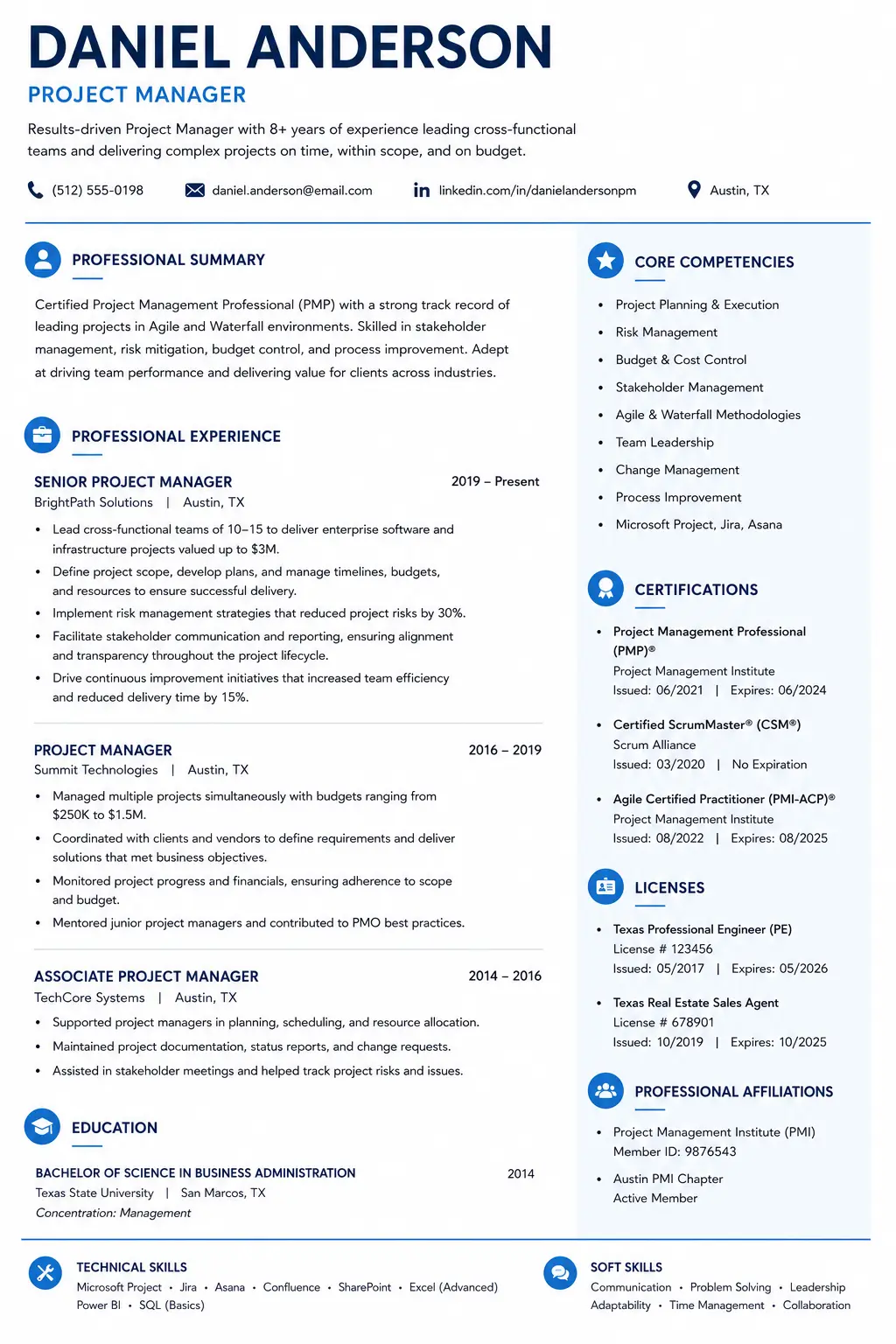
Certifications on Resume Example
Complete resume example with certifications section showing proper placement and formatting for different credential types.
Common Mistakes to Avoid
- Listing certifications at the bottom: Recruiters may miss them. Move them to a prominent location.
- Only using acronyms: ATS may not recognize them. Include full name and acronym.
- Not including expiration dates: Recruiters need to verify validity. Always include if applicable.
- Listing irrelevant certifications: Wastes space and distracts. Only include relevant credentials.
- Lying about certifications: Easily verified; damages credibility. Be honest; list in-progress certs.
- Inconsistent formatting: Looks unprofessional. Use consistent format for all entries.
Expert Quotes to Remember
“"Certifications are some of the highest-value lines on a resume: they are objective, verifiable proof of a skill, and recruiters and applicant tracking systems (ATS) actively search for them by name."”
“"Workers with a currently active certification or license participated in the labor force at a higher rate and had a lower unemployment rate than people without one."”
“"For professions such as HR, where there are well-recognized professional credentials, searches will also frequently include SHRM-CP, SHRM-SCP and other prominent designations that instantly add credibility to your resume."”
“"If you have a certification that allows you to use a professional designation, you can include it next to your name in the resume header. Professional designations are a sign of competence due to their qualification requirements."”
“"Certifications strengthen your resume and show employers you're invested in your professional development."”
Sources & References
- Bureau of Labor Statistics (BLS) – Labor force participation, earnings, and unemployment data for certified workers
- Indeed – Step-by-step guidance on listing certifications
- Monster – Reasons to include certifications, types of certifications
- Resumly – Where to place certifications, formatting guidelines
- StylingCV – Industry-specific certification value
- SHRM – HR credential credibility
Conclusion: Make Your Certificates Work for You
Certifications are powerful proof of your skills and commitment. According to the Bureau of Labor Statistics, certified workers earn more, have higher labor force participation, and lower unemployment rates.
The key is to present them effectively:
- Place certifications strategically — near the top for license-required roles, in a dedicated section for most others
- Format consistently — include the full name, acronym, issuing organization, and date
- Include expiration dates — transparency builds trust
- List in-progress certifications — show you are actively developing skills
- Only include relevant certifications — quality over quantity
Action Steps for Today:
1. Review your resume and identify all certifications you hold
2. Create a dedicated "Certifications" section if you don't have one
3. Format each entry using the standard format above
4. Add expiration dates where applicable
5. If you have a license-required credential, move it to the header
6. Build your ATS-friendly resume with our ATS CV Maker
Where should I put certifications on my resume?
The placement depends on the role. If the certification is legally required (e.g., RN, CPA, CDL), place it in your header or near the top. For most roles, create a dedicated 'Certifications' or 'Licenses & Certifications' section. According to Resumly, for most jobs, certifications belong in their own clearly labeled section placed below your work experience and education.
How do I list certifications on a resume?
Use the standard format: Certification Name (Acronym) — Issuing Organization, Earned Month Year · Expires Month Year · Credential ID. Include the full name and acronym (e.g., 'Project Management Professional (PMP)'), the issuing organization, and the date earned. Include expiration dates if applicable.
What certifications should I put on my resume?
Include certifications that are relevant to the role, current, and meaningful. Industry-standard certifications like PMP, AWS Certified, CPA, RN, SHRM-CP, and CompTIA Security+ are highly valuable. Avoid generic online course completion certificates and outdated or irrelevant credentials.
Should I include certifications in progress on my resume?
Yes, you can list in-progress certifications if you include the expected completion date. Example: 'AWS Certified Solutions Architect — Amazon Web Services, Expected 2026.' According to Monster, only list credentials you have actually earned, and keep in-progress certifications clearly labeled.
What is the difference between a license and a certification?
A license is legal permission to practice a profession issued by government or regulatory bodies (e.g., RN, CPA, CDL). A certification is a voluntary credential demonstrating expertise issued by professional associations or training organizations (e.g., PMP, AWS Certified, SHRM-CP). Licenses are usually required; certifications are often optional but highly valued.
How do I format certifications on my resume?
Use consistent formatting for all certifications. Include the full certification name, acronym, issuing organization, date earned, expiration date (if applicable), and credential ID (if applicable). Example: 'Project Management Professional (PMP) — Project Management Institute, 2024'.
About the Author
Ash is a resume expert and career strategist who helps job seekers land their dream roles. With years of experience in resume writing and ATS optimization, Ash has helped thousands of candidates create resumes that get noticed. Ash's work has been featured in leading career publications and is trusted by job seekers worldwide.
Comments
Loading comments…