Where to Put Certifications on Resume: 4 Placement Options
Where to put certifications on your resume. Learn the 4 best placement options, when to use each, and examples of properly formatted certifications sections.
Introduction: Where to Put Certifications on a Resume
One of the most common questions job seekers ask is: "Where do certifications go on a resume?" The answer depends on several factors, including the nature of the certification, the role you are applying for, and your career stage.
According to Resumly, for most jobs, certifications belong in their own clearly labeled "Certifications" or "Licenses & Certifications" section placed below your work experience and education. This keeps the resume scannable: experience earns the interview, and the certifications section backs it up with credentials a recruiter can verify.
According to SHRM, well-recognized professional credentials like SHRM-CP and SHRM-SCP "instantly add credibility to your resume." But placement matters — a certification buried at the bottom of a resume may never be seen.
This guide covers the 4 best placement options for certifications on your resume, when to use each, and real examples of properly formatted certifications sections.
“Certification Placement — Key Takeaways
Required licenses go in the header
Optional certifications go in a dedicated section
Place certifications after experience for most roles
Place certifications before experience for required roles
Highlight key certifications in your summary
Use consistent formatting for all certifications
ATS scans certifications by name and acronym”
What You'll Learn in This Guide
- The 4 placement options for certifications
- When to use each placement option
- How to decide the best placement for your resume
- Real examples of properly formatted certifications sections
- Common placement mistakes to avoid
Option 1: In the Header (After Your Name)
If a certification or license is a hard requirement to do the job — a Registered Nurse license, a CPA, a Commercial Driver's License, a Professional Engineer license — it should appear at the top, in your name line, professional title, or summary.
According to Indeed:
> "If you have a certification that allows you to use a professional designation, you can include it next to your name in the resume header. Professional designations are a sign of competence due to their qualification requirements."
Recruiters screening for these roles scan for the credential in the first few seconds. Burying a required license at the bottom can get you filtered out before anyone reads your experience.
When to use this option:
- The job legally requires it — nurse (RN/LPN), CPA, attorney (bar admission), CDL driver, licensed electrician
- The certification IS the qualification — for a "PMP-certified Project Manager" or "AWS Solutions Architect" role
- You are early-career — if a relevant certification is stronger than your thin work history
Example:
> Steve Burrow (CPA) Whitehorse, Yukon | 224-544-3455 | steveburrow@email.com
Example 2:
> Sarah Johnson, RN, BSN Los Angeles, CA | (555) 987-6543 | sarah.johnson@email.com
Option 2: In Your Professional Summary
Your resume summary is a brief section after your resume header that highlights your most impressive qualifications. It is an appropriate place to highlight certifications you want the hiring manager to see.
When to use this option:
- You have multiple certifications you want to highlight
- The certification is highly relevant to the role
- You want to demonstrate continuous learning and professional development
Example:
> "Certified CFA with over seven years of experience advising individuals and organizations on viable investment options. Possess additional financial certifications, including Certified Financial Planner (CFP) and Chartered Professional Accountant (CPA)."
Example 2:
> "PMP-certified Project Manager with 10+ years of experience leading cross-functional teams. AWS Certified Solutions Architect and Certified ScrumMaster (CSM)."
Option 3: In a Dedicated Certifications Section
For most roles, create a separate "Certifications" or "Licenses & Certifications" section. This is the most common and recommended approach.
According to Resumly:
> "For most jobs, certifications belong in their own clearly labeled 'Certifications' or 'Licenses & Certifications' section placed below your work experience and education."
Placement options within this section:
| Placement | Best For | Why |
|---|---|---|
| Near the top (after summary) | Roles where certifications are vital | Ensures hiring manager sees them immediately |
| After education | Certifications that don't directly relate to the role but taught essential skills | Shows additional qualifications without distracting |
| After work experience | Most roles | Experience earns the interview; certifications back it up |
Example:
> Certifications
>
> - Project Management Professional (PMP) — Project Management Institute (2020)
> - Certified ScrumMaster (CSM) — The Scrum Team (2018)
> - CompTIA Project+ Certification (2016)
Example 2:
> Certifications
>
> - Certified Public Accountant (CPA) — Texas State Board of Accountancy, 2022
> - Certified Financial Planner (CFP) — CFP Board, 2023
> - Certified Internal Auditor (CIA) — Institute of Internal Auditors, 2024
Option 4: In Your Work Experience Section
If your certification also doubles as a designation or job title, consider including it in your work description. This approach allows you to demonstrate how the certification relates to your work duties and achievements.
When to use this option:
- The certification is directly tied to your job title
- You want to show how the certification enabled your achievements
- The certification is industry-specific and relevant to the role
Example:
> Chartered Financial Analyst (CFA) Arkinson Financial Services Ltd, Toronto, Ontario, 2018—2020
How to Decide the Best Placement
Use this decision framework to determine the best placement for your certifications:
| Scenario | Recommended Placement | Why |
|---|---|---|
| Certification is legally required (RN, CPA, CDL) | Header (after your name) | Recruiters scan for it immediately |
| Certification is the qualification (PMP, AWS Certified) | Header or Summary | Lead with your strongest credential |
| You are early-career (limited experience) | Near the top | Certifications balance thin work history |
| Certifications are optional but relevant | Dedicated section after experience | Experience earns the interview; certifications back it up |
| You have multiple certifications | Dedicated section + Summary | Highlight key ones in summary; list all in dedicated section |
| Certification is in-progress | Dedicated section with 'Expected' date | Shows continuous learning without misleading |
Common Placement Mistakes to Avoid
- Burying required certifications at the bottom: If your certification is legally required, place it in the header. Recruiters scan for it immediately.
- Creating a Certifications section but placing it too low: If certifications are vital to the role, move the section near the top.
- Only listing certifications without dates: Recruiters need to know when you earned it and if it is still valid.
- Including certifications in the wrong place: Follow the decision framework above to choose the best placement.
- Forgetting to include acronyms: Include both the full name and acronym for ATS keyword matching.
- Inconsistent formatting: Use the same format for all certification entries.
Certification Placement: Complete Resume Example
“JANE DOE, CPA
(555) 555-5555 | janedoe@email.com | linkedin.com/in/janedoe
Professional Summary
Certified Public Accountant with 8+ years of experience in financial analysis and audit. Expertise in GAAP compliance, financial reporting, and tax strategy. Possess additional certifications including Certified Financial Planner (CFP).
Certifications
- Certified Public Accountant (CPA) — Texas State Board of Accountancy, 2022
- Certified Financial Planner (CFP) — CFP Board, 2023
- Certified Internal Auditor (CIA) — Institute of Internal Auditors, 2024
Professional Experience
Senior Financial Analyst | ABC Corporation | 2020-Present
- Led financial audit teams for 15+ clients across healthcare and technology sectors
- Achieved 100% compliance with GAAP and regulatory standards
Education
MBA, University of Texas at Austin (2018)
BS in Accounting, Texas A&M University (2015)”
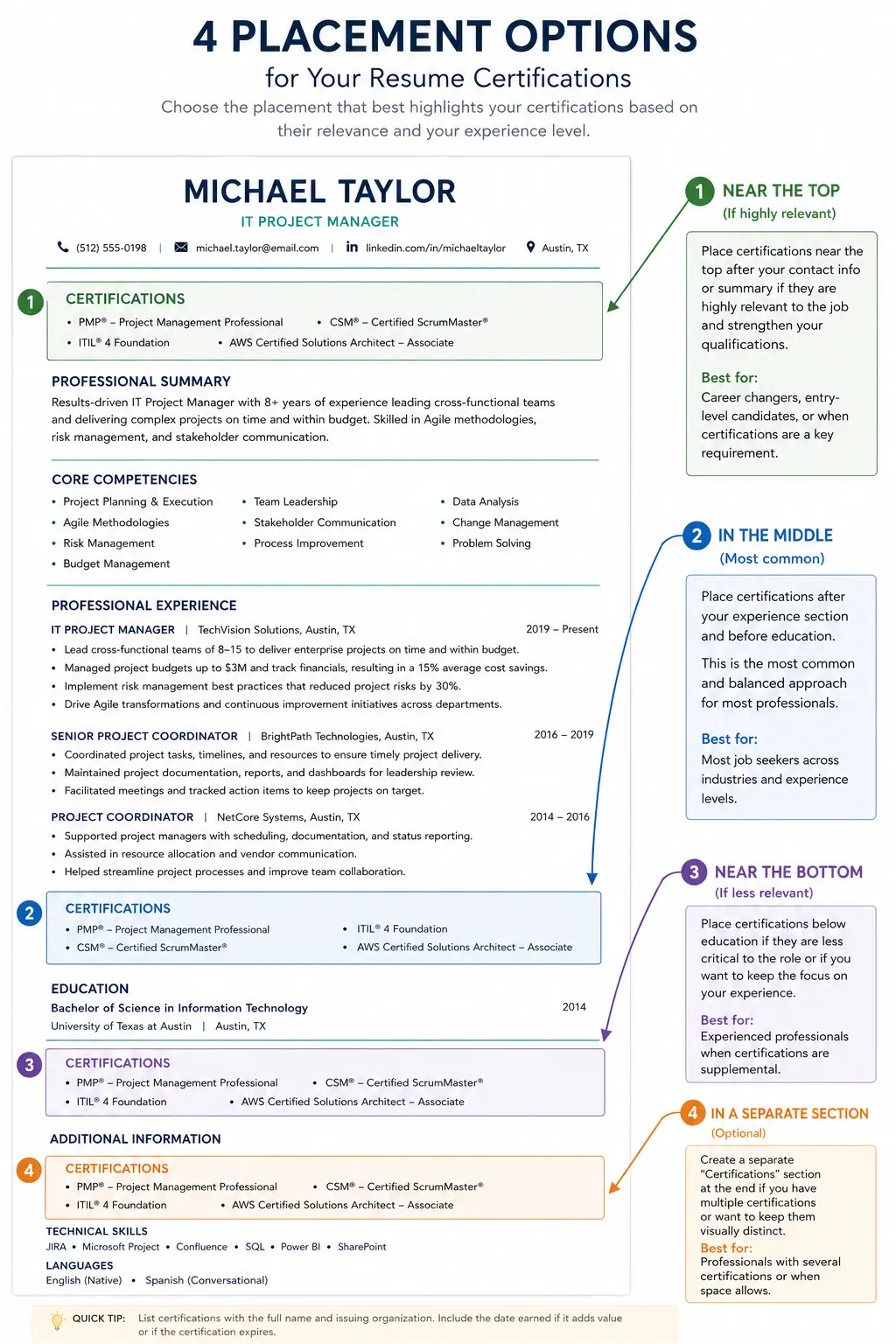
Certification Placement Example
Complete resume example showing proper placement of certifications in header, summary, dedicated section, and work experience.
Expert Quotes to Remember
“"If you have a certification that allows you to use a professional designation, you can include it next to your name in the resume header. Professional designations are a sign of competence due to their qualification requirements."”
“"For most jobs, certifications belong in their own clearly labeled 'Certifications' or 'Licenses & Certifications' section placed below your work experience and education."”
“"For professions such as HR, where there are well-recognized professional credentials, searches will also frequently include SHRM-CP, SHRM-SCP and other prominent designations that instantly add credibility to your resume."”
Sources & References
- Resumly — Where to place certifications, formatting guidelines
- Indeed — Header placement, professional designations
- SHRM — HR credential credibility
Conclusion: Place Your Certifications Strategically
Where you place certifications on your resume can be as important as which certifications you list. According to Indeed, professional designations in your header are "a sign of competence due to their qualification requirements."
Key Takeaways:
- Required licenses go in the header (after your name)
- Optional certifications go in a dedicated section
- Place certifications after experience for most roles
- Place certifications before experience for required roles
- Highlight key certifications in your summary
- Use consistent formatting for all certifications
- Include both full name and acronym for ATS keyword matching
Action Steps for Today:
1. Review your resume and identify all certifications you hold
2. Determine which placements are best for each certification
3. Move required licenses to your header
4. Create a dedicated "Certifications" section if you don't have one
5. Format each entry using the standard format
6. Build your resume with our ATS CV Maker
Where do certifications go on a resume?
The best place for certifications depends on the role. If the certification is legally required (e.g., RN, CPA, CDL), place it in your header or near the top. For most roles, create a dedicated 'Certifications' section below your work experience. According to Resumly, certifications belong in their own clearly labeled section placed below your work experience and education.
Should certifications go before or after experience?
For most roles, place certifications after your work experience. Experience earns the interview; certifications back it up. However, if the certification is legally required or you are early-career with limited experience, place certifications before or near the top.
Can I put certifications in my resume summary?
Yes, you can highlight key certifications in your professional summary. Example: 'Certified CFA with over seven years of experience... Possess additional certifications including Certified Financial Planner (CFP) and CPA.'
Should I put certifications in my header?
Yes, if the certification is legally required (e.g., RN, CPA, CDL, PE). Example: 'Steve Burrow (CPA).' For optional certifications like PMP or AWS Certified, they should go in a dedicated Certifications section.
What is the best placement for certifications on a resume?
According to SHRM and Indeed, the best placement depends on the role. Required licenses go in the header. Optional certifications go in a dedicated 'Certifications' or 'Licenses & Certifications' section placed after your work experience.
About the Author
Ash is a resume expert and career strategist who helps job seekers land their dream roles. With years of experience in resume writing and ATS optimization, Ash has helped thousands of candidates create resumes that get noticed. Ash's work has been featured in leading career publications and is trusted by job seekers worldwide.
Comments
Loading comments…