Licenses and Certifications on Resume: What's the Difference?
Learn the difference between licenses and certifications on your resume. See examples of how to list RN, CPA, PMP, SHRM-CP, and other credentials.
Introduction: Licenses vs. Certifications — What's the Difference?
Understanding the distinction between licenses and certifications is essential for presenting them correctly on your resume. According to the Bureau of Labor Statistics (BLS), workers with a currently active certification or license had lower unemployment rates and higher earnings. Median earnings for workers with a required certification or license were $1,224 in 2018, compared to $929 for those without.
According to Monster, "If your certification is required by law or industry regulation, make sure it is easy to find on your resume, ideally near your name or in a dedicated section."
This guide covers the key differences between licenses and certifications, how to list each on your resume, and real examples.
“Licenses vs. Certifications — Key Takeaways
Licenses are legally required (RN, CPA, CDL)
Certifications are voluntary (PMP, AWS, SHRM-CP)
Licenses go in the header or near the top
Certifications go in a dedicated section
Include license numbers for verification
Include expiration dates for both
Use consistent formatting for all entries”
What You'll Learn in This Guide
- The key differences between licenses and certifications
- When to use each on your resume
- How to format licenses on your resume
- How to format certifications on your resume
- Real examples of licenses and certifications
- Common mistakes to avoid
Licenses vs. Certifications: Key Differences
| Licenses | Certifications | |
|---|---|---|
| Definition | Legal permission to practice a profession | Voluntary credential demonstrating expertise |
| Issued By | Government or regulatory bodies | Professional associations or training organizations |
| Required | Yes (legally required to work) | No (optional but highly valued) |
| Examples | RN, CPA, CDL, PE, Bar Admission | PMP, AWS Certified, SHRM-CP, CISSP |
| Placement | Header or near the top | Dedicated Certifications section |
| Renewal | Often requires continuing education | Often requires continuing education |
| Portability | Usually state-specific | Often nationally or globally recognized |
Licenses: What They Are and How to List Them
What Is a Professional License?
A license is legal permission granted by a government or regulatory body to practice a profession. It is typically required by law to perform certain roles. Without a license, you cannot legally work in that profession.
Examples of Licensed Professions:
- Registered Nurse (RN) — State Board of Nursing
- Certified Public Accountant (CPA) — State Board of Accountancy
- Commercial Driver's License (CDL) — Department of Motor Vehicles
- Professional Engineer (PE) — State Board of Professional Engineers
- Attorney — State Bar Association
- Licensed Realtor — State Real Estate Commission
- Medical Doctor (MD) — State Medical Board
How to Format a License on Your Resume
Use this standard format for listing a professional license:
Format:
> License Name — Issuing Organization, License #XXXXX, Date Earned (expires Date)
Examples:
> Registered Nurse (RN), License #RN1234567 — California Board of Registered Nursing, 2023
>
> Certified Public Accountant (CPA) — Texas State Board of Accountancy, 2022
>
> Commercial Driver's License (CDL), Class A — Texas Department of Public Safety, 2023
>
> Licensed Real Estate Agent — California Department of Real Estate, License #01234567, 2023
Where to Place Licenses on Your Resume
According to Indeed:
> "If you have a certification that allows you to use a professional designation, you can include it next to your name in the resume header. Professional designations are a sign of competence due to their qualification requirements."
Placement Options for Licenses:
| Placement | Best For | Why |
|---|---|---|
| Header (after your name) | Required licenses (RN, CPA, CDL, PE) | Recruiters scan for it immediately |
| Professional Summary | Highlighting licensure | Shows qualification upfront |
| Licenses & Certifications Section | Multiple licenses | Centralized, organized listing |
| Near the top | Roles where licensure is critical | Ensures it doesn't get buried |
Certifications: What They Are and How to List Them
What Is a Professional Certification?
A certification is a voluntary credential that demonstrates expertise in a specific area. It is issued by professional associations, training organizations, or companies. Certifications are not legally required to work, but they significantly enhance your qualifications.
Examples of Professional Certifications:
- Project Management Professional (PMP) — PMI
- AWS Certified Solutions Architect — Amazon Web Services
- SHRM Certified Professional (SHRM-CP) — SHRM
- Certified Information Systems Security Professional (CISSP) — ISC²
- Google Analytics Certified — Google
- CompTIA Security+ — CompTIA
- Certified ScrumMaster (CSM) — Scrum Alliance
How to Format a Certification on Your Resume
Use this standard format for listing a professional certification:
Format:
> Certification Name (Acronym) — Issuing Organization, Date Earned (expires Date)
Examples:
> Project Management Professional (PMP) — Project Management Institute, 2024
>
> AWS Certified Solutions Architect – Associate — Amazon Web Services, 2025 (expires 2028)
>
> SHRM Certified Professional (SHRM-CP) — SHRM, 2024
>
> Certified Information Systems Security Professional (CISSP) — ISC², 2024
Where to Place Certifications on Your Resume
According to Resumly:
> "For most jobs, certifications belong in their own clearly labeled 'Certifications' or 'Licenses & Certifications' section placed below your work experience and education."
Placement Options for Certifications:
| Placement | Best For | Why |
|---|---|---|
| Dedicated Certifications Section | Most roles | Keeps them organized and scannable |
| Professional Summary | Key certifications | Highlights them upfront |
| Skills Section | Software certifications | ATS keyword matching |
Licenses and Certifications: Complete Resume Examples
Example 1: Healthcare Professional
“SARAH JOHNSON, RN, BSN
(555) 987-6543 | sarah.johnson@email.com | Los Angeles, CA
Professional Summary
Registered Nurse with 5+ years of experience in critical care. BLS and ACLS certified. Committed to providing compassionate, patient-centered care.
Licenses & Certifications
- Registered Nurse (RN), License #RN1234567 — California Board of Registered Nursing, 2023
- BLS for Healthcare Providers — American Heart Association, 2024 (expires 2026)
- ACLS Provider — American Heart Association, 2024 (expires 2026)
Professional Experience
Registered Nurse | City Hospital | 2020-Present
- Provide direct patient care in a 30-bed medical-surgical unit
Education
BSN, University of Southern California (2019)”
Example 2: Accounting Professional
“JANE DOE, CPA
(555) 555-5555 | janedoe@email.com | linkedin.com/in/janedoe
Professional Summary
Certified Public Accountant with 8+ years of experience in financial analysis and audit. Expertise in GAAP compliance, financial reporting, and tax strategy.
Licenses & Certifications
- Certified Public Accountant (CPA) — Texas State Board of Accountancy, 2022
- Certified Financial Planner (CFP) — CFP Board, 2023
- Certified Internal Auditor (CIA) — Institute of Internal Auditors, 2024
Professional Experience
Senior Financial Analyst | ABC Corporation | 2020-Present
- Led financial audit teams for 15+ clients
Education
MBA, University of Texas at Austin (2018)”
Example 3: IT Professional
“MICHAEL CHEN
(555) 123-4567 | michael.chen@email.com | San Francisco, CA
Professional Summary
Cloud Solutions Architect with 7+ years of experience designing and implementing scalable cloud infrastructure. AWS Certified Solutions Architect and CompTIA Security+ certified.
Certifications
- AWS Certified Solutions Architect – Associate — Amazon Web Services, 2025 (expires 2028)
- Certified Information Systems Security Professional (CISSP) — ISC², 2024
- CompTIA Security+ — CompTIA, 2024
Professional Experience
Cloud Solutions Architect | CloudTech Inc. | 2020-Present
- Designed cloud infrastructure for 50+ enterprise clients
Education
MS in Computer Science, Stanford University (2018)”
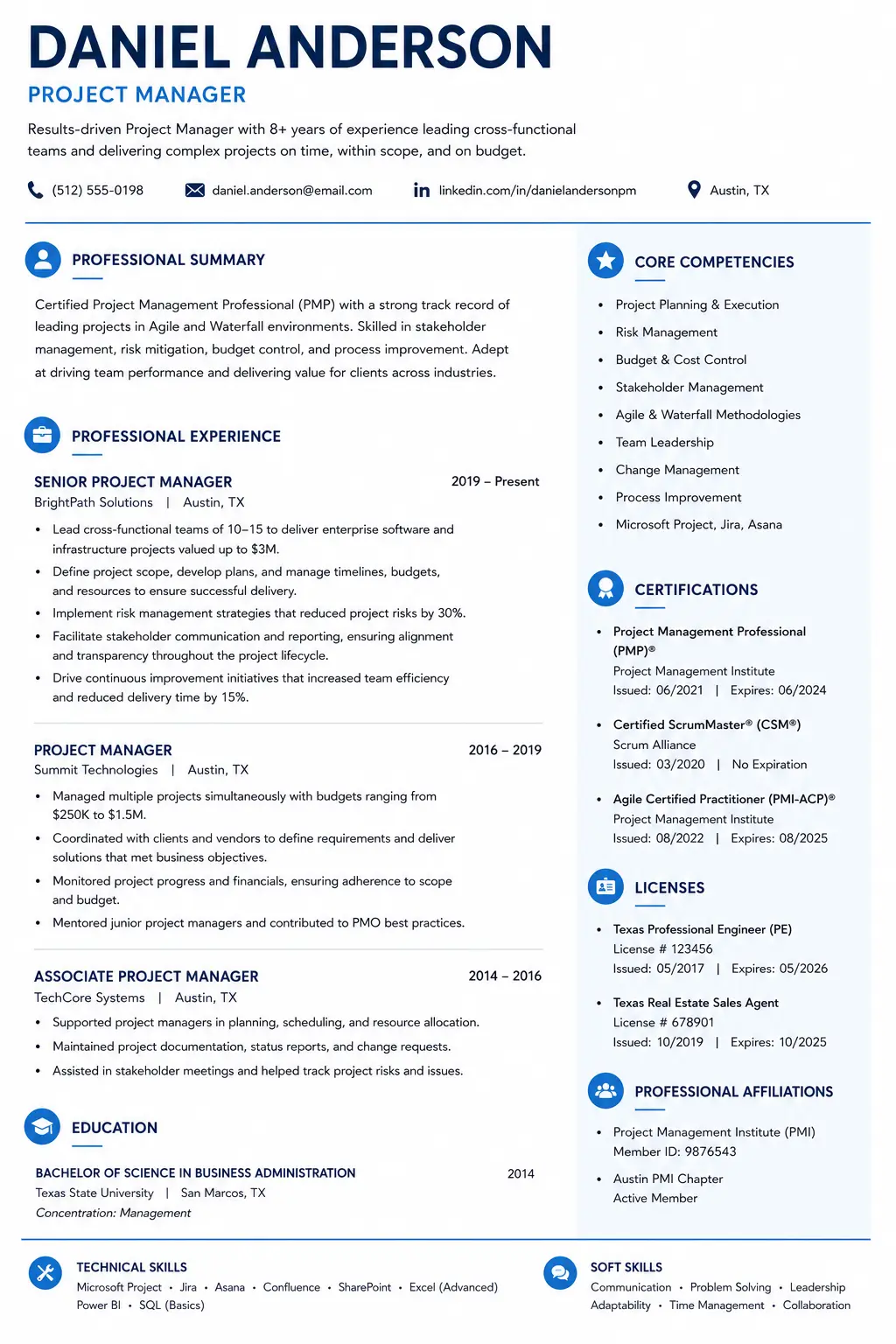
Licenses and Certifications Resume Example
Complete resume example showing proper placement and formatting of licenses and certifications for different professions.
Common Mistakes to Avoid
- Confusing licenses with certifications: Licenses are legally required; certifications are voluntary.
- Burying required licenses at the bottom: Place required licenses in the header or near the top.
- Not including license numbers: Include license numbers for verification.
- Listing expired certifications or licenses: Only list currently active credentials.
- Inconsistent formatting: Use the same format for all entries.
- Not including expiration dates: Recruiters need to verify validity.
- Only using acronyms: Include both full name and acronym.
Expert Quotes to Remember
“"If you have a certification that allows you to use a professional designation, you can include it next to your name in the resume header. Professional designations are a sign of competence due to their qualification requirements."”
“"Workers with a currently active certification or license participated in the labor force at a higher rate and had a lower unemployment rate than people without one."”
“"Certifications strengthen your resume and show employers you're invested in your professional development."”
Sources & References
- Bureau of Labor Statistics (BLS) – Certified workers earn more, lower unemployment
- Indeed – License placement, professional designations
- Monster – Why to include licenses and certifications
- Resumly – Certification formatting
Conclusion: Master Licenses and Certifications on Your Resume
Understanding the difference between licenses and certifications is essential for presenting them correctly on your resume. According to the Bureau of Labor Statistics, certified and licensed workers earn more and have lower unemployment rates.
Key Takeaways:
- Licenses are legally required; place them in the header or near the top
- Certifications are voluntary; place them in a dedicated section
- Include license numbers for verification
- Include expiration dates for both
- Use consistent formatting for all entries
- Only include currently active credentials
Action Steps for Today:
1. Review your resume and identify all licenses and certifications
2. Move required licenses to your header
3. Create a dedicated "Licenses & Certifications" section
4. Format each entry using the standard format
5. Add expiration dates and license numbers
6. Build your resume with our ATS CV Maker
What is the difference between a license and a certification on a resume?
A license is legal permission to practice a profession issued by government or regulatory bodies (e.g., RN, CPA, CDL). A certification is a voluntary credential demonstrating expertise issued by professional associations or training organizations (e.g., PMP, AWS Certified, SHRM-CP). Licenses are usually required; certifications are often optional but highly valued.
How do I list a professional license on my resume?
Use this format: License Name — Issuing Organization, License #XXXXX, Date Earned. For required licenses, place them in your header (after your name) or near the top. Example: 'Registered Nurse (RN), License #RN1234567 — California Board of Registered Nursing, 2023.'
Should I include my license number on my resume?
Yes, for professional licenses like RN, CPA, PE, or CDL. Including the license number makes it easy for employers to verify your credentials. However, for optional certifications like PMP or AWS Certified, a license number is not usually required.
Do certifications expire on a resume?
Many certifications do expire and require renewal. Always include expiration dates if applicable. According to Monster, only list credentials you have actually earned and are currently active. If your certification has expired, do not include it.
Can I put a license in my resume header?
Yes, if the license is legally required for the role (e.g., RN, CPA, CDL, PE). Example: 'Steve Burrow (CPA).' According to Indeed, professional designations in the header are 'a sign of competence due to their qualification requirements.'
About the Author
Ash is a resume expert and career strategist who helps job seekers land their dream roles. With years of experience in resume writing and ATS optimization, Ash has helped thousands of candidates create resumes that get noticed. Ash's work has been featured in leading career publications and is trusted by job seekers worldwide.
Comments
Loading comments…